
How to Train and Compile YOLOv8 for Hailo-8: From Dataset to HEF

A practical model-development workflow for custom object detection, ONNX export, INT8 quantization and Hailo compilation.
Training a YOLOv8 object detection model is only the first part of deploying it on Hailo-8. The PyTorch checkpoint produced by training must be exported, parsed, quantized, compiled and verified before the Hailo accelerator can execute it.
For an industrial PPE detection application, SwitchBox developed that model path on a Linux workstation and deployed the resulting Hailo Executable Format, or HEF, file to an embedded system. The model identified missing hard hats and high-visibility vests in images from the intended camera environment.
This article focuses on the development-computer side of the project: the dataset, YOLOv8 training, ONNX, Hailo Archive files, INT8 calibration, HEF compilation and verification. The separate embedded-integration article covers i.MX 8, GStreamer, camera streams, post-processing and machine I/O.
The short answer
To train and compile a custom YOLOv8 model for Hailo-8:
Define the object classes and collect representative images.
Annotate the images and create training, validation and test splits.
Train and validate the YOLOv8 model on a development workstation.
Export the PyTorch .pt checkpoint to ONNX.
Parse the ONNX graph into a Hailo Archive, or HAR.
Optimize and quantize the model with representative calibration images.
Compile the optimized HAR into a Hailo Executable Format, or HEF, file.
Compare model behavior after every conversion stage.
The training and compilation work occurs on a supported Linux x86-64 system. The Hailo-8 does not train the model. It executes the compiled HEF through HailoRT on the target device.
Understand the model file path
The explicit workflow used in the project moved through these artifacts:

Each transition is a verification boundary. A tool can generate the next file successfully while still changing preprocessing, output nodes, class ordering, coordinates, confidence scores or accuracy.
File | Purpose |
.pt | Trained PyTorch checkpoint produced by the YOLO workflow |
.onnx | Portable graph used as an interchange format for the Hailo compiler |
Parsed .har | Hailo representation after translating the source graph |
Optimized .har | Quantized and hardware-optimized Hailo representation |
.hef | Deployable binary executed on the selected Hailo accelerator |
Step 1: Define classes before collecting data
The model can only learn the rules represented by the images and annotations. Define the classes precisely before a large labeling effort begins.
For a PPE application, questions include:
Is the model detecting the presence of a hard hat or explicitly detecting its absence?
Does a partially visible hard hat count?
How should a vest beneath an open jacket be labeled?
How much of a person or object must be visible?
How should reflections, printed images and background objects be handled?
Which conditions belong in the same class, and which require separate classes?
A written annotation guide reduces inconsistency between labelers. If one person labels a partially visible item and another does not, the dataset teaches conflicting rules.
The class definition should also reflect the application logic. A model that detects person, hardhat and vest may require spatial association logic to determine which equipment belongs to which person. A model trained on explicit absence classes produces a different output structure and different failure modes.
Step 2: Capture representative images
A pretrained model has learned useful visual features, but it has not seen the exact camera, lens, compression, viewpoint, equipment and lighting of the intended application.
Representative data should include:
Images from the target camera whenever possible
Different lighting levels, shadows and glare
Indoor and outdoor conditions when applicable
Multiple camera positions and viewing angles
People facing different directions
Partial occlusion and crowded scenes
Motion blur and compression artifacts
Different clothing colors and styles
Empty scenes and negative examples
Objects that resemble the target classes
Negative examples are important. If every image contains a target object, the model may learn that it should always find something.
Collect difficult examples intentionally. The rare conditions most likely to produce errors in the field may not appear in a convenient sample of normal operation.
Step 3: Annotate the images in a YOLO-compatible format
Raw image files do not identify the class or location of an object. Object detection annotations normally record a class identifier and bounding box for each labeled object.
CVAT's Ultralytics YOLO format supports bounding-box detection and exports a dataset structure that includes a data.yaml file, image lists and per-image label files. A YOLO detection label records the class plus normalized center coordinates, width and height.
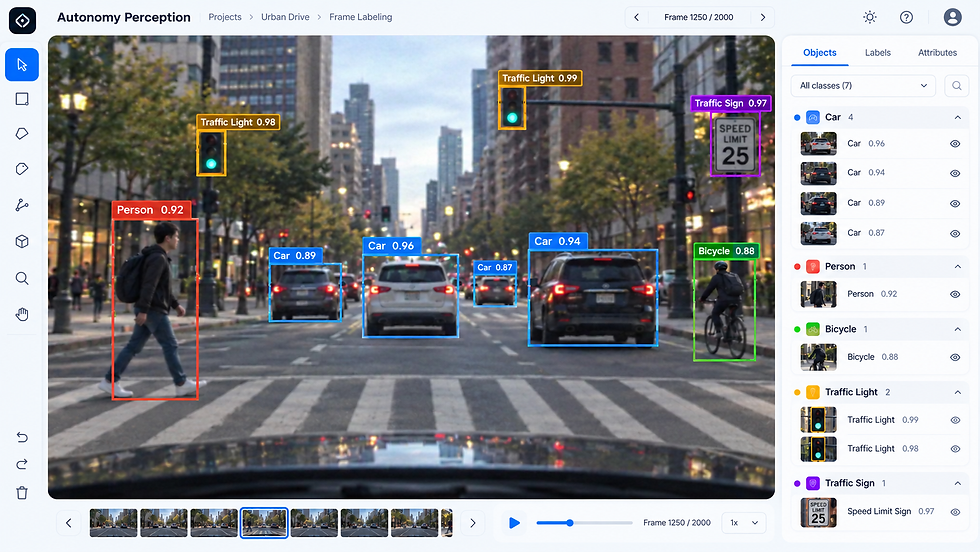
Annotation quality checks should look for:
Missed objects
Boxes that are too loose or too tight
Inconsistent handling of partial objects
Incorrect class identifiers
Duplicate boxes
Different interpretations of the same edge case
Review a sample from every labeler before scaling the annotation effort. Correcting the rules after thousands of images have been labeled is expensive and can leave hidden inconsistencies.
Step 4: Separate training, validation, test and calibration data
These datasets serve different purposes:
The training set updates the model weights.
The validation set supports model selection and tuning.
The test set provides an independent final evaluation.
The calibration images help the Hailo compiler determine numerical ranges for quantization.
The final test set should remain independent. Do not reuse it to tune the model or calibrate the Hailo export if the goal is to measure generalization and conversion loss honestly.
Calibration images do not require labels for the quantization process, although labeled images are useful when measuring the optimized model afterward. They may come from representative training or validation data. What matters most is that they resemble production inputs.
Avoid random frame leakage. Adjacent frames from the same video are often nearly identical. If those frames are randomly divided among training and test sets, the test result may appear stronger than performance on a genuinely new scene. Splitting by recording session, location or time period can provide a more realistic evaluation.
Step 5: Train the YOLOv8 model
SwitchBox used the Ultralytics YOLO toolset and a pretrained YOLOv8 checkpoint as the starting point.
Pretrained weights reduce the amount of training normally required because the network has already learned general visual features. Custom images and annotations adapt those features to the target classes and environment.
With the dataset YAML in place, a basic Ultralytics training command takes this form:
yolo detect train model=/path/to/pretrained-yolov8.pt data=/path/to/dataset.yaml imgsz=640This is a starting point, not the project's complete training recipe. Select image size, model size, batch size, augmentation, training duration and other settings against the application's accuracy requirements and target-pipeline capacity. Pin the Ultralytics version used for a controlled build.
Training produces a .pt checkpoint containing the learned weights.
Step 6: Validate the PyTorch checkpoint
Do not judge the model only by a few attractive example images. Evaluate:
Precision
Recall
Mean average precision
Performance by class
False-positive patterns
False-negative patterns
Performance under difficult lighting, occlusion and motion
Stability across sequences of video frames
The correct balance between precision and recall depends on the application. A nuisance alert, a missed inspection feature and a missed safety-related condition have different consequences.
Store a fixed evaluation set and preserve representative failure cases. Those same images become the comparison set for ONNX export and Hailo compilation.
Step 7: Export YOLOv8 from PyTorch to ONNX
The .pt checkpoint cannot be executed directly by the Hailo-8 in the explicit toolchain used for this project. ONNX provides the interchange graph that Hailo's Dataflow Compiler can parse.
Ultralytics supports ONNX through its model export workflow. A basic export command is:
yolo export model=/path/to/best.pt format=onnx imgsz=640The export settings must match the intended compilation path. Confirm the input shape, normalization, output nodes, opset and graph operations supported by the selected Hailo toolchain.
Test the ONNX output before moving forward. If the PyTorch checkpoint behaves correctly but the ONNX model does not, the issue was introduced at export rather than quantization or HEF compilation.
Step 8: Parse the ONNX graph into a Hailo Archive
Hailo's Dataflow Compiler translates the ONNX graph into Hailo's internal representation. The parser produces a Hailo Archive, or HAR, containing the model state needed for later optimization and compilation.
Object detection graphs may require the correct input and output nodes to be selected. The appropriate nodes depend on the exported model and the post-processing path. Reusing parser settings from another YOLO family can produce a graph that compiles but exposes the wrong tensors.
A parsed HAR is not yet the deployed model. It represents the network before the principal hardware optimization and quantization step.
Step 9: Optimize and quantize the HAR
The source model normally uses floating-point values. The Hailo export path maps the network to a quantized 8-bit integer representation for the target accelerator.
Representative calibration images help the compiler estimate activation ranges. Current Ultralytics Hailo export guidance recommends at least 1,024 diverse calibration images for best accuracy and emphasizes that the images should represent production lighting, viewpoints, objects and backgrounds.
Treat 1,024 as toolchain guidance, not a universal law. The most important principle is in-domain relevance. A large collection of unrelated images can be less useful than a carefully selected set from the actual camera environment.
The project also used a model script to configure additional processing, including non-maximum suppression and a higher optimization level. Non-maximum suppression filters overlapping detection candidates and retains the most useful results based on confidence and overlap.

Quantization creates a new validation boundary. A model can compile successfully and still lose meaningful accuracy.
Step 10: Compile the optimized HAR into an HEF
The Hailo compiler turns the optimized HAR into a Hailo Executable Format file.
The .hef is the binary loaded through HailoRT and executed on the selected Hailo accelerator. It contains the hardware-specific compiled model, but it does not replace the surrounding application.
The target still needs:
Camera acquisition and decoding
Frame conversion and resizing
HailoRT or GStreamer integration
Model-specific post-processing
Application decision logic
Display, logging, CAN or other machine outputs
Hailo's Model Zoo describes the same core progression: parse the source model, optimize it, compile an HEF and evaluate the result.
The direct YOLO-to-Hailo export path as of August 2026
As of August 2026, Ultralytics releases can automate the intermediate ONNX, parsing, optimization and compilation stages for supported models and targets.
For a custom YOLOv8 model targeting Hailo-8, the current CLI form is:
yolo export model=/path/to/best.pt format=hailo name=hailo8 imgsz=640 data=/path/to/dataset.yamlSeveral details matter:
Set name=hailo8 explicitly. If name is omitted, the current exporter defaults to hailo8l.
Hailo-8 and Hailo-8L use the DFC v3.x generation. Artifacts for different Hailo hardware families are not interchangeable.
Pass representative in-domain data for a production calibration set.
An HEF is compiled for a fixed input shape. The host must resize frames to that shape or use a separately compiled HEF.
Compilation occurs on Linux x86-64, not on the embedded ARM target.
The automated path can remove manual steps for supported combinations. It does not remove the need to control versions or verify the output on the exact accelerator and HailoRT release used in the product.
The SwitchBox project used the explicit ONNX-to-HAR-to-HEF workflow because its target Fusion Yocto image, HailoRT runtime and post-processing components needed to remain compatible. For an embedded product, the newest compiler is not automatically the correct compiler.
Step 11: Verify every representation
The project used a fixed subset of test images throughout Hailo model generation. Hailo Python API scripts ran inference against:
The parsed HAR
The optimized and quantized HAR
The final HEF
An end-to-end validation plan should also compare the trained PyTorch model and exported ONNX graph using the appropriate runtime for each representation. Compare actual detections, not only whether an inference call completed.
Potential failure modes include:
Incorrect graph output nodes
Different input normalization
Image resizing or letterboxing differences
Quantization loss
Incorrect class ordering
Wrong tensor dimensions or coordinate interpretation
Post-processing configured for another YOLO variant
Confidence thresholds copied from the floating-point model without retesting
When the same evaluation images are used at each boundary, the team can identify the first stage where behavior changes.
Preserve a complete version matrix
The model file is only one part of a reproducible build. Record:
Ultralytics version
PyTorch version
YOLO model family and checkpoint
Input image size
ONNX opset and export arguments
Hailo Dataflow Compiler version
Hailo Model Zoo or model-script version
Optimization and quantization settings
Calibration dataset identity
Hailo target name
HailoRT version on the embedded device
Post-processing library version
Yocto image or BSP version
A newer workstation toolchain can create an HEF that an older target runtime cannot load. Pinning the complete stack prevents a successful experiment from becoming an unreproducible build.
Common mistakes when compiling YOLOv8 for Hailo-8
Using out-of-domain calibration images
Calibration data should resemble the real camera environment. Generic images may not represent the lighting, backgrounds, compression or viewpoints used in production.
Treating successful compilation as successful validation
An HEF can be generated without proving that coordinates, classes and confidence values are correct.
Compiling for the wrong Hailo target
The Hailo-8 and Hailo-8L are different targets. Set name=hailo8 when using the direct Ultralytics exporter for a Hailo-8 deployment.
Changing the compiler without checking HailoRT
The workstation compiler, target HailoRT and generated HEF must be compatible. The target image determines which toolchain can be used safely.
Testing still images but not video sequences
A detector can look accurate on selected images while producing unstable results from frame to frame. The surrounding application may need temporal filtering and alert logic.
Frequently asked questions
What is the difference between ONNX, HAR and HEF?
ONNX is the interchange graph exported from the training framework. HAR captures the model during Hailo parsing and optimization. HEF is the final compiled binary executed by the Hailo device.
Does the Hailo calibration dataset need labels?
The quantization process uses representative images and does not require labels. Labels are still valuable for measuring accuracy after optimization.
Can Ultralytics export YOLOv8 directly to Hailo-8?
As of August 2026, yes. Ultralytics supports direct Hailo export for standard YOLOv8 detection models. Set the Hailo target, input size and representative dataset explicitly, then validate the exported artifact against the target stack.
Why can accuracy change after quantization?
Quantization represents model values with lower-precision numerical formats. Calibration data and compiler decisions affect how closely the optimized model preserves the floating-point model's behavior.
Is the HEF the complete application?
No. The HEF is the compiled neural-network artifact. The target application still needs camera handling, preprocessing, inference orchestration, post-processing and response logic.
Should the latest Hailo compiler always be used?
No. Use a compiler generation and release compatible with the target accelerator, HailoRT version and embedded image. Validate the complete version matrix.
Continue the series
Part 1: How Industrial Computer Vision Works at the Edge: From Cameras to Machine Controls
Coming Soon: Part 3: How to Deploy YOLOv8 on i.MX 8 with Hailo-8, GStreamer and Yocto
Training produces a model. A controlled deployment process produces an artifact that can be trusted on the target. The difference is disciplined data selection, version control and verification at every conversion boundary.

Comments